Neptune Snapchat Planet Meaning: What the Blue Planet Means in Snapchat+ Solar System
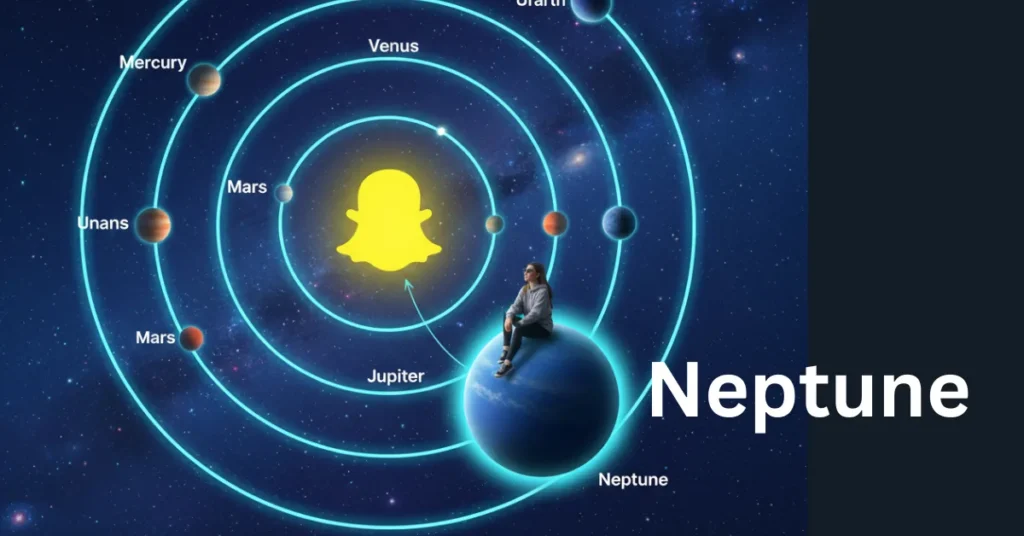
Neptune on Snapchat is the blue planet showing you’re #8 (the farthest) in friend’s Solar System. More interactions will help you get closer to the sun.
Ever wondered why you are at the outermost orbit of your friend’s solar system? It is because you have had the least interaction with him and consequently appeared as Neptune, Snapchat Planet, the farthest in the Snapchat solar system. It will not necessarily always remain in the same position, as there are many tips to get into a better position.
In this article, we will look into Neptune Snapchat Planet in depth and will try to answer all your queries about it. Why do we end up on Neptune? How to recover, and what are the tips we can follow for better rankings? Everything will be covered in detail here. So stay tuned.
Key Takeaways
🔵 Neptune represents your #8 (farthest) position in someone’s Snapchat Solar System, meaning you are still in their top 8 Best Friends but with the lowest interaction level.
🪐 Neptune is the outermost planet in the Snapchat+ ranking system, showing a connection that exists but is less active compared to Mercury, Venus, or other closer planets.
🔄 Your Neptune position is not permanent and can change anytime. More consistent Snaps, Chats, and real engagement can move you closer to Uranus, Saturn, or even higher.
📉 Lower interaction keeps you in the outer orbit, since Snapchat rankings are based purely on activity, not loyalty or real-life closeness.
✨ The blue color and sparkles around Neptune Snapchat planet are cosmetic, matching the real planet and not officially tied to ranking meaning.
Before digging deep, get to know something about the Snapchat Solar system.
Some Lines on Snapchat Friend Solar System
Snapchat Friend Solar System is a Snapchat+ feature that turns your friendships into a simple “planets” visual, giving an appealing and engaging look. It’s meant to show how your connection compares inside a Best Friends lineup, without showing any private messages.
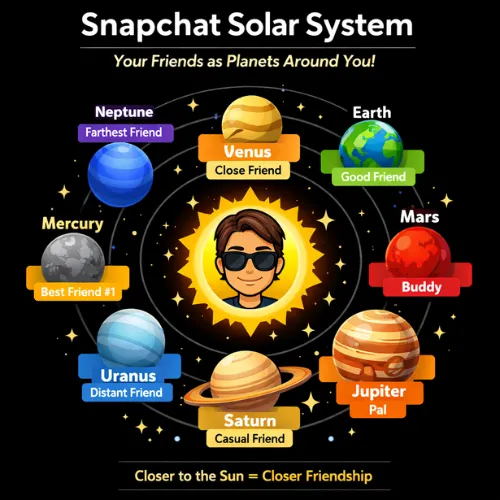
It can be seen in the profile in Snapchat Plus, in which you are placed as the sun, and 8 planets revolve around you in order. Mercury is closest, and Neptune Snapchat planet stands the farthest. These rankings are determined based on real interactions like snaps, streaks, and messages. The more you engage with a friend, the stronger your friendship will be and ranked higher.
Important clarification
When you tap the badge on someone’s Friendship Profile, Snapchat isn’t showing “your 8th friend.” It shows which planet you are in their Solar System, and each planet matches a position in their Best Friends list.
Simple example:
If you open Ali’s profile, tap the Best Friends badge, and you see Neptune Snapchat planet, that means you are Ali’s #8 Best Friend (the last spot in his top 8).
It does not mean Ali is your #8 friend, and it doesn’t tell you who your own Neptune is.
Neptune’s place in the Snapchat planets order
Snapchat’s Friend Solar System follows the same planet order you already know, starting closest and moving outward.
Here’s the quick order (closest → farthest):
So yes, Neptune snapchat planet is 8th and last in the lineup (the “farthest” position in the visual).
What Neptune says about the friendship level
Neptune Snapchat planet usually means you’re still in their top 8 Best Friends, but you’re at the edge of that group (the “farthest” spot), so the connection exists, but least active than any other friends closer in their Solar System.
Why does that happen?
Neptune sits at the very edge of the ranking simply because seven other people currently interact with that friend more than you do on Snapchat, through more frequent snaps, chats, or story replies. It doesn’t mean the friendship faded; it just means, right now, your Snapchat activity with them is lighter than the other seven spots.
What it does not mean:
It’s not a measure of loyalty, real-life closeness, or how much someone cares; it’s simply an activity-based snapshot.
One more thing: it can change over time as your snapping and chatting patterns change. So being in good interactions can really lift you up.
How to see Neptune on Snapchat (step-by-step)
Why is Neptune blue (and what do stars/sparkles mean)?
There is no reason behind Neptune Snapchat Planet. It is just the same as the real Neptune planet. Inside Snapchat’s Friend Solar System, that blue look is basically a theme choice to match the real planet. Remember, the color has nothing to do with its ranking in Snapchat Plus.
What do Stars/sparkles mean around Neptune?
- Many users see little stars, glitter, or sparkle effects around Neptune Snapchat planet in the graphic.
- There are no official reasons for these, and we can also make some guesses, like sparkles show you are still an important friend, and some work can be done to get improved rankings.
- Actually, these are cosmetic things and should not be taken so seriously.
You an also check how Snapchat Location works.
Can your Neptune Snapchat planet change?
Yes, it can change, but you can’t manually set it like a profile setting. You can’t “pick” Neptune, Mercury, or any other planet on purpose from a menu.
What changes it is your real activity. Snapchat’s planets reflect your position in someone’s Best Friends list, and Best Friends are based on who they Snap and Chat with the most. That list can update regularly, so your planet can move closer (or farther) over time as your interaction patterns shift.
How to move from Neptune Snapchat planet to a closer planet
Neptune means you’re #8 in their Best Friends list. The way to move closer is simple: increase genuine Snap + Chat interaction. Since Best Friends are based on who someone snaps and chats with the most, a small, consistent effort beats one big burst.
Practical, non-spammy actions:
- Send consistent snaps + real chats: a quick snap with a short message (“this reminded me of you”) works better than empty snaps.
- Reply to stories naturally: react when you actually have something to say, keep it human, not forced.
- Keep it steady over time: a little interaction every few days often matters more than doing a lot in one day and disappearing.
Don’t do this:
You might be interested in knowing what does the purple circle in the Snapchat app indicates.
- Don’t spam blank snaps just to “rank up.”
- Don’t send the same message repeatedly or force constant streaks if the vibe isn’t mutual.
- Don’t turn the feature into a test of loyalty; it’s based on app activity, not the whole relationship.
FAQs
Final Thoughts
Neptune in Snapchat’s Friend Solar System isn’t a “bad” sign; it simply means you’re still in someone’s top 8 Best Friends, but you’re sitting at the farthest spot in that lineup. It’s basically Snapchat’s way of turning everyday snapping and chatting into a fun visual, not a serious rating of your real relationship.
If you want to move closer than Neptune, focus on what actually works: normal, genuine interaction over time, real chats, meaningful snaps, and natural replies, without forcing it. Following these simple things might be helpful in getting higher rankings in the Snap solar system. So next time, see you on a higher ranked planet.